
Calhoun County Traffic Court Records
Traffic tickets in Calhoun County generally land in Magistrate Court. The Magistrate Clerk keeps the case file. Two statewide tools offer limited access to case information and payment records. The free Magistrate Court Case Search works by name or case number. The Magistrate Court Payment System works from a Citation ID, Case ID, or Payment Plan ID. Neither tool is a substitute for the actual Calhoun County traffic court file.
Town ordinance matters take a separate route. Grantsville posts no municipal docket portal and names no current municipal judge. A notice may cite a town ordinance or municipal court. If so, call Grantsville Town Hall to confirm which court now handles it. It might instead carry a magistrate name or a state case identifier. Then use the magistrate route. Whatever the notice itself says should control. Check the issuing authority, court name, case number, and appearance place.
Choose a Calhoun Traffic ID
The Magistrate Court Payment System offers three exact-match searches, and you must pick one. Dashes and other characters count. It works best with the ticket or payment papers in hand. The system is not a broad name search or a full Calhoun County traffic docket.
| Field | Format and use | Required |
|---|---|---|
| Citation ID Number | Exact displayed digits; optional Citation County selector | For citation route |
| Citation County | Optional dropdown used to narrow a known county | No |
| Case ID Number | ##-M##X-##### or M##M-########## | For case route |
| Payment Plan ID | MC##-#####, exact match only | For plan route |
| Search | Submit after the displayed verification step | Action control |
That official page lays out the search fields along with the online charge, and it can be checked directly at the state payment source.
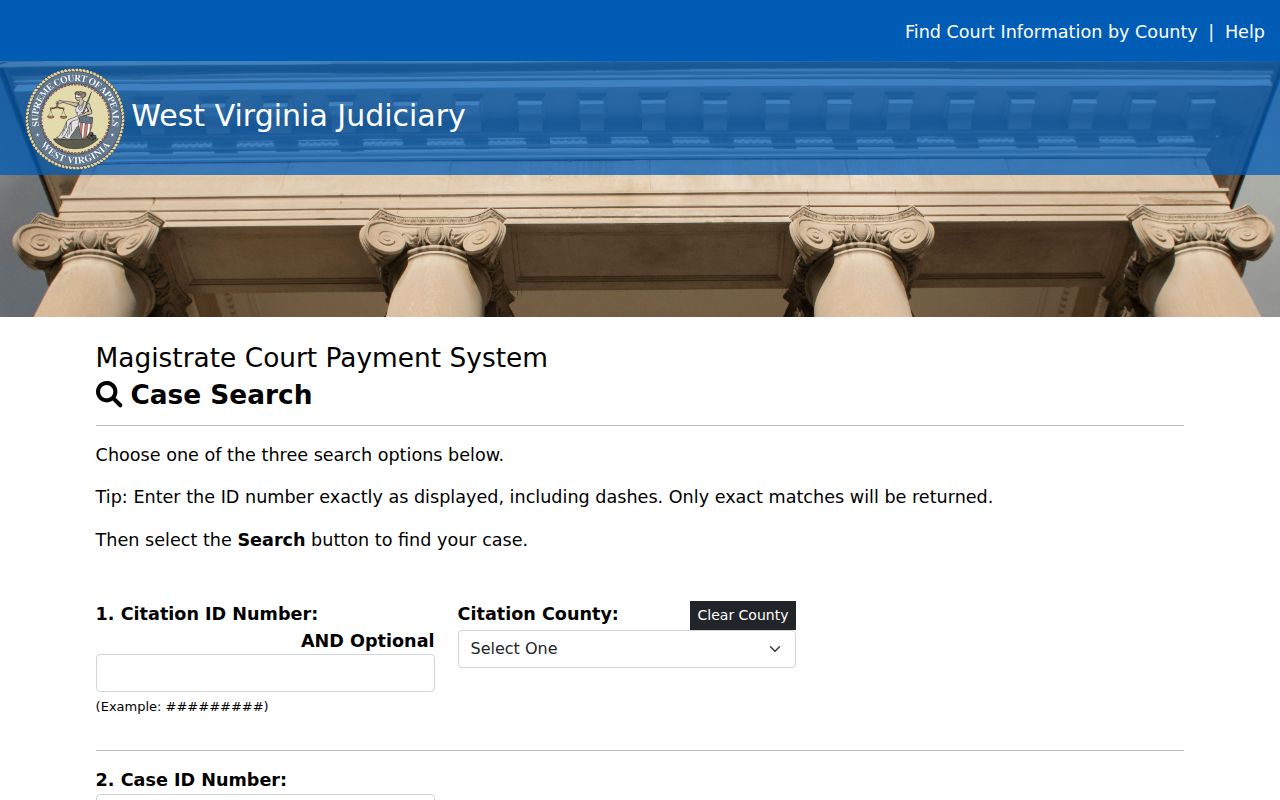
One look at the field layout explains the trouble. A single missing dash can return no exact match even when the court case exists.
Looking Up a Traffic Ticket
Start with the identifier printed on the citation. An exact payment search may come up empty. Do not assume the Calhoun County ticket is void or sealed. Move to the free public Magistrate Court Case Search instead. It accepts a first and last name or a case number with no registration. It caps results at 30 records. A common name can be harder to pin down than one exact case number.
- Read the citation and identify the issuing court, county, Citation ID, Case ID, and appearance information.
- Use the payment system for an exact Citation ID, Case ID, or Payment Plan ID lookup.
- Use Magistrate Court Case Search for name-based or case-number information.
- Call the Calhoun Magistrate Clerk at 304-354-6698 if the ticket is absent, new, or unclear.
- Visit the Magistrate Clerk counter in Suite 103 at 363 Main Street when a direct file check or copy is needed.
The clerk can also arrange a mailed copy request. Confirm the record, price, payee, payment type, and mailing steps before sending any funds. The online magistrate search lists documents but does not let you download them.
Missing Calhoun Traffic Search Results
A missing result usually has one of four causes. The wrong portal may have been used. The identifier may have lost its exact dashes. The case may not have posted yet, or the matter may belong to a town rather than Magistrate Court. Begin with the printed notice and compare the court and county. Then retype the exact identifier before switching to a name or case-number search. Save the time and type of any error you get.
Best next step: Give the Calhoun Magistrate Clerk the issuing court, exact citation or case number, issue date, and the court date printed on the paper.
The clerk can validate the local file and explain how to get its public documents. The clerk cannot give legal advice or promise that a portal gap moves a response date. For a municipal ordinance or city process, Grantsville Town Hall at 304-354-7500 is the status check, but only when the notice names one.
How to Find Your Traffic Court Date
A Calhoun County traffic court date may sit right on the citation. It also appears in the Magistrate Case Detail event schedule, which lists Event Type, Date/Time, Room, Location, Judge, and Reason Closed. A later continuation or closure entry can change how an older date reads. Check the newest signed order and the clerk's current docket setting before you travel.
| Citation or Case ID | Use the exact ##-M##X-#####-type format when that pattern appears. |
|---|---|
| Event type | Identifies a court hearing or other scheduled event. |
| Date and time | States the listed setting; confirm whether it remains current. |
| Room and location | Directs the person to the assigned place. |
| Judge | Names the judicial officer tied to that entry. |
| Reason closed | May show that the event was continued or closed, not that the whole case ended. |
The county publishes no official daily trial-docket URL. The clerk phone, the counter, event data, the paper notice, and the newest order are the real date channels. General Circuit term dates are not individual traffic court dates.
Read Calhoun Traffic Docket Events
One docket event is one step, not the whole outcome. “Motion to Continue” records a request, nothing more. A continuation can close one scheduled event and open a later setting. “Reason Closed” describes the event line, while the case disposition records the court's actual outcome. A charge stays an allegation until the record shows a plea, judgment, dismissal, or other disposition.
- Appearance date
- A date recorded for an appearance; confirm whether it is current or historical.
- Disposition
- The result entered for a charge or case event.
- Docket entry
- A dated register line for a filing, order, hearing, transfer, or other action.
- Reason closed
- Status text for an event, which does not by itself resolve the full Calhoun County traffic case.
When a result drives a deadline or formal request, get the underlying order or certified disposition from the clerk. A short portal label is not enough to rely on.
Pay or Contest a Ticket
The citation, summons, or Calhoun Magistrate Clerk supplies the current response date. The court publishes no single local pay-by date, contest deadline, or deferred-disposition period. Assume none. Payment and contest are separate choices. Before paying, confirm the court amount. Confirm the online charge, payment-plan terms, and whether payment completes the court response. Before contesting, call the clerk promptly and ask how to preserve the hearing request.
| Pay the Calhoun ticket | Contest the Calhoun ticket |
|---|---|
| Verify the exact amount and case first. | Preserve the citation and contact the clerk promptly. |
| Use the portal only with an exact identifier. | Ask for the appearance or hearing date and response method. |
| Confirm the $2 online payment charge. | Do not assume an online payment leaves the contest route open. |
| Keep the receipt and case identifier. | Keep the filed response and all setting notices. |
Missed appearance: Failure to appear can create a new docket event, warrant, collection step, or licensing consequence. Ask the clerk or Division of Motor Vehicles what currently applies.
A brief online status does not settle every consequence. Read the new docket entry, confirm the court's order, and ask the clerk what step comes next.
Two Calhoun Traffic Portals
Calhoun County gives traffic cases two different online tools. The Magistrate Court Case Search finds case information. It works by a person's name or a case number. The payment system works differently. It checks one exact citation, case, or payment-plan identifier and then handles the payment itself. Keep their limits in mind. A payment lookup is not a full court docket, and a case-search result is not a downloadable court record.
The case search can display filing date, case location, and charge. It also shows disposition and a list of documents. It warns that the data may not be complete or exact. Verify any match with the clerk. A broad search stops at 30 entries, so the case you want may not appear. One name can fit more than one person. Matching on case number and location is far safer.
Note: Use the payment portal only for a specific payment task. For the Calhoun court record, pair the Magistrate search with the clerk.
Traffic Court Record vs Driving Record
Two different offices keep these two records. The Calhoun Magistrate Clerk holds the court file behind a traffic citation, which may include the citation itself, docket entries, a plea, the disposition, fine details, hearing events, and court orders. The West Virginia Division of Motor Vehicles keeps everything else: the driving record, license status, points, and reinstatement terms. Neither file counts as a certified copy of the other.
| Court traffic record | Driving record | |
|---|---|---|
| Custodian | Calhoun Magistrate Clerk | West Virginia Division of Motor Vehicles |
| Shows | Citation, docket, court events, disposition, and orders | Driving history, license status, points, and reinstatement data |
| Request route | MCR search, phone, counter, mail, and clerk copies | State motor-vehicle record channel |
That split heads off a common records mistake. A court portal cannot issue a certified DMV record, and a DMV file cannot stand in for a certified Calhoun County court disposition.
Calhoun Traffic Retention Limits
How long a record is kept and what you can see online are separate questions. Magistrate Rule 12 treats several case types differently for retention. Paid citations, dismissed citations, failures to appear, unpaid fines, appeals, and DUI or revoked-DUI matters each get their own rule. A longer retention rule does not promise that every document shows up in the free public search. The clerk may still be the only route to a copy.
The judiciary also offers SCA-C906 for certain misdemeanor violations and traffic citations. Any expungement claim turns on the current form, statute, timing, and exclusions. Section 61-11-26B sets limits for commercial-license and DUI-related matters. Those rules govern the court record remedy. Anyone with a specific Calhoun County case should confirm eligibility and filing steps with the court. Do not infer them from an old search result.
Calhoun Traffic Copies at the Clerk
After an online match, the Calhoun Magistrate Clerk is the place to get actual documents. The office sits in Suite 103 of the Calhoun County Courthouse at 363 Main Street, Grantsville, WV 26147. Call 304-354-6698 with the exact case or citation ID. Have ready the document you need, the copy type, and whether you want mail or pickup. The fax number is 304-354-9041.
The official Calhoun Magistrate Court profile names the local office and its contact lines. Confirm the cost and payment method before you send a request.
Copies and Fees
Copies come from the local clerk. The public Magistrate Case Search does not deliver documents online. State administrative rules set the copy and fax rates. Ask the clerk whether certification adds a fee. Ask also which payment methods are accepted and whether you prefer mail or pickup. For case payment, the separate state portal lists its own per-payment charge.
| Calhoun traffic item | Fee | Notes |
|---|---|---|
| Magistrate plain copy | 25 cents per page | Request from the Magistrate Clerk |
| Magistrate fax copy | $2 per page | Confirm fax procedure first |
| Online court payment | $2 per payment | Added by the official payment system |
| Certified disposition | Confirm current fee | State the copy type when ordering |
The Magistrate administrative rules spell out the accepted payment instruments and copy rates. Call 304-354-6698 before mailing any payment or personal information.